

29.08.2025
QKS Review
QKS Review: Enterprise AR Platforms: CAD-Driven Authoring vs Remote Support Capabilities
Author:
Nithin A K


Executive Summary:
As the enterprise augmented reality market faces rising pressure from accelerating digital transformation initiatives, skills shortages in field service teams, and increasing demands for zero-downtime operations, organizations are moving beyond traditional enterprise augmented reality software tools.
This review blog by QKS Group assesses whether enterprise augmented reality software vendors are truly innovating to meet these demands, or merely making incremental updates.
What Modern Enterprise Augmented Reality Software Should Deliver:
Today’s platforms must offer more than core visual support features. Critical next-gen capabilities include:
- Automated CAD-to-AR instruction generation to transform engineering designs into immersive service workflows
- Integrated remote IT/OT device control within AR sessions for end-to-end troubleshooting
- Enterprise-scale deployment with security, compliance, and global infrastructure support
Key Findings:
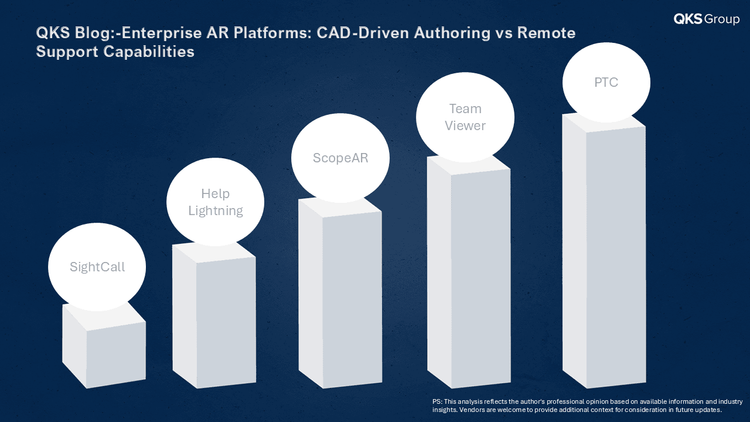
- Leading vendors (PTC, TeamViewer) stand out with comprehensive, enterprise-grade solutions that deliver both automated CAD integration and advanced remote device control.
- Capable vendors (ScopeAR, Help Lightning, SightCall) show promise in specialized areas but lack breadth in either CAD automation or integrated IT/OT control required for full enterprise deployment.
- Lagging vendors- There are no “lagging” vendors in this set-each platform offers enterprise-grade AR capabilities. The distinction is purely based on breadth of CAD automation and IT/OT control, not on overall quality or readiness
When enterprises evaluate augmented reality (AR) platforms, two technical capabilities consistently influence IT decisions:
- Automated AR instruction generation from CAD/PLM models
- Integrated remote IT/OT device access within AR support sessions
These features directly impact how easily organizations can scale AR adoption across engineering, service, and operations. We reviewed five enterprise AR vendors - PTC, TeamViewer, ScopeAR, Help Lightning, and SightCall -against these criteria. The findings show a clear separation between leaders that combine automation and connectivity, and those offering only baseline AR support.
PTC: CAD-to-AR Automation Leader
PTC’s Vuforia suite delivers strong capabilities in CAD-driven AR instruction generation. With tools such as Vuforia Studio and Vuforia Instruct, enterprises can import 3D CAD data and automatically create AR work instructions tied to the digital thread. Updates in CAD or PLM systems flow directly into AR guidance, helping reduce redundant authoring and ensuring consistency between design and service documentation. For organizations managing complex products, this approach offers a scalable and automation-first pathway to AR adoption.
TeamViewer: AR + Remote Device Control
TeamViewer’s Smart Service solution integrates AR-powered guidance with enterprise-grade remote access to IT/OT devices. A technician can receive AR overlays from an expert while the expert also connects securely to machine software,including firmware, control panels, and diagnostics, using features such as VPN tunneling and port forwarding. This combination enables troubleshooting and guided support within a single session, addressing both visual and system-level challenges in industrial environments.
Capable Vendors
ScopeAR: CAD-Based Authoring (Manual)
ScopeAR’s WorkLink platform supports CAD-based AR authoring but relies on manual processes. Users can upload CAD files and add instructions through a browser-based interface, which simplifies content creation compared to coding. However, it does not provide the automated CAD-to-AR workflow available from some competitors. The platform is effective for AR visualization and expert guidance but does not include built-in remote machine-control features.
Help Lightning -Strong AR Guidance, Limited Beyond
Help Lightning provides effective remote collaboration through its “merged reality” approach, where an expert’s view blends with a field technician’s for real-time guidance. This supports troubleshooting and knowledge transfer in a practical way. However, the platform does not include CAD-based AR automation or integrated IT/OT device access. Its strength lies in live AR guidance rather than end-to-end digital instruction workflows.
SightCall: Visual Support, Not CAD or Remote Control
SightCall specializes in real-time visual assistance and Digital Flows for process automation rather than CAD-based AR authoring. The platform does not offer CAD model import or automated AR instruction generation from engineering data, focusing instead on service-oriented AR experiences and workflow digitization. SightCall offers screen sharing and co-browsing capabilities for application guidance, along with remote camera control features. However, it does not provide direct IT/OT device control or terminal access for industrial systems, focusing instead on visual support and process guidance.
Conclusion
Enterprise AR adoption depends on more than just video overlays. Platforms that connect AR to core engineering data (CAD/PLM) or enable direct IT/OT device troubleshooting stand out as strategic investments. PTC leads for CAD-driven automation, TeamViewer for AR + device control integration, while ScopeAR, Help Lightning, and SightCall remain valuable but narrower in scope.
For CIOs and operations leaders, the review highlights clear patterns. PTC demonstrates the strongest alignment where CAD-to-AR automation and digital thread integration are strategic priorities. TeamViewer shows particular strength in environments where AR guidance and secure IT/OT connectivity need to work hand in hand. ScopeAR, Help Lightning, and SightCall provide effective AR support for day-to-day service and collaboration, though typically with more manual authoring requirements or without the deep integration layers seen in the leaders.
Disclaimer:
This blog is based on independent research and publicly available information. The insights presented reflect the views of QKS Group and are for informational purposes only. While we strive for accuracy, we do not guarantee completeness or absolute correctness. Vendors are welcome to provide clarifications or updates. If any vendor listed in this analysis wishes to provide additional context or clarification, we welcome a briefing call and will consider incorporating relevant updates. This analysis is not intended to disparage any vendor but to provide an informed, balanced perspective. We encourage open and constructive dialogue to foster transparency and a deeper understanding of the industry.
Author: Nithin A K, Analyst at QKS Group
Vendors: